
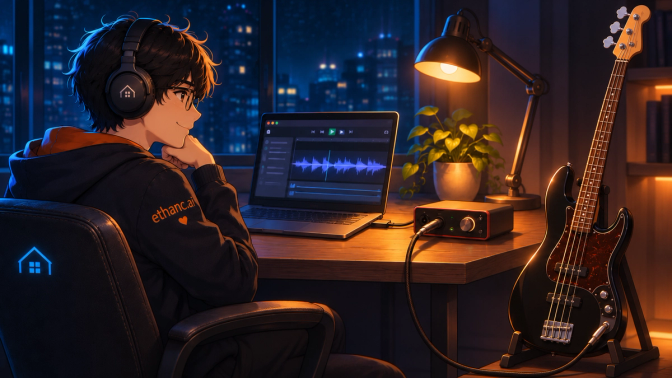
🎸 Background
One electric bass. One USB audio interface. No standalone amplifier. An AI laptop that apparently needed another job.
The experiment: turn Haus into a Linux digital audio workstation suitable for voice generation, music generation, and live instrument recording.
There was already plenty of software on Haus capable of making sounds. This time, EthanC wanted to find out what happened when an actual instrument got involved.
Why bass? Drums were considered for years. Bass takes up less space. It also seemed like a perfectly reasonable idea to sit in a park at midnight, play bass through headphones, and run everything from an AI laptop with no amplifier, no audience, and no explanation.
We want to flex playing bass through a laptop instead of an amp. Because we can.
Haus had previously survived an unnecessarily adventurous Linux audio-stack investigation. Naturally, this presented a masochistic opportunity to create another questionable hardware project on Ubuntu.
🔧 The Setup
The requirements were simple: practice silently through headphones, hear a tutorial or backing track at the same time, and record bass into the DAW when needed. No standalone bass amplifier was part of the plan.
| Component | What We Used |
|---|---|
| Workstation | Haus — AFTERSHOCK laptop, Intel Core Ultra 9 275HX, RTX 5090 |
| OS | Ubuntu 22.04.5 LTS |
| Bass guitar | Yamaha TRBX174 · black · four-string, passive |
| Audio interface | Behringer U-PHORIA UMC22 |
| Headphones | Sony WH-1000XM6 (XM6), wired |
| DAW | REAPER 7.83 for Linux |
| Cables | 3 m 6.35 mm instrument cable; 3.5 mm headphone cable + stereo 6.35 mm adapter |
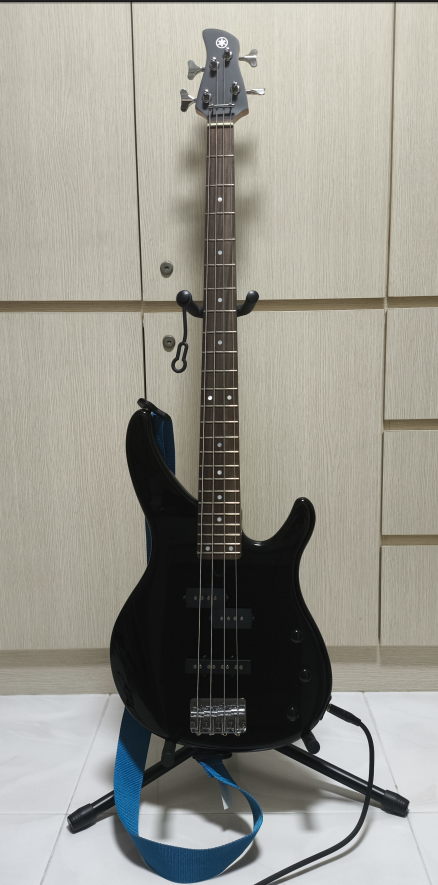
🎸 Bass-chan — Yamaha TRBX174
Why this bass? Price. And noob bass for noob EthanC. Perfectly reasonable.
A four-string entry-level instrument with passive pickups was enough for a guy with too many open projects. The black finish was chosen because it matches the instruments used by his favourite band. Apparently, even the visual identity of a favourite band now influences hardware purchases.
EthanC sees no problem with this.
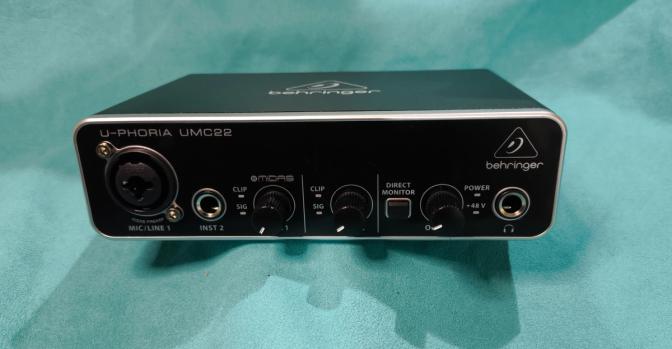
⚙️ Audio Interface — Behringer UMC22
We needed an instrument input, USB recording, and headphone monitoring. The relatively inexpensive UMC22 offered all three, including a DIRECT MONITOR switch for hearing the live bass without sending it through software first. Powered by USB. No separate mains supply needed.
We even took Haus to the shop intending to test compatibility. There was no demo unit. Oh well.
Linux Device Naming: On Haus, Ubuntu identified the interface as "Analog Input/Output PCM2902 Audio Codec", not "Behringer UMC22". The interface worked with existing Linux USB-audio support. No vendor driver installation was required.
⚙️ Headphones — Sony WH-1000XM6
The XM6 had already survived a previous Haus audio-stack adventure. That story is here. This time, it just needed to be plugged in.
⚙️ DAW — REAPER
Why REAPER? Because Linux. Native Linux build, multitrack recording support, and a convenient place to combine instrument recordings with future voice and music experiments.
Downloaded the Linux x86-64 archive, extracted it, ran install-reaper.sh. REAPER went into ~/opt/REAPER with desktop integration enabled. It launched almost immediately.
This was suspiciously painless.
📡 Signal Paths — One Box, Two Jobs
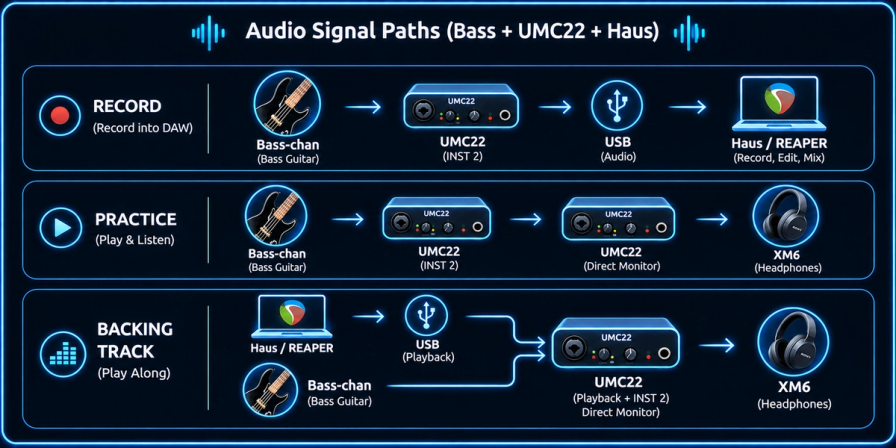
The UMC22 handles two distinct jobs: recording audio into Haus over USB, and sending both live bass and computer playback to the headphones simultaneously.
Setup: bass into INST 2, phantom power OFF, DIRECT MONITOR ON, headphone output kept low. GAIN 2 controlled the instrument-input level; the OUTPUT knob controlled what reached the headphones.
First attempt: no POWER light. The interface was connected through a USB hub. Moving the cable directly to Haus restored power.
🔍 Observations
🔍 First Recording
The UMC22 appeared in Ubuntu Sound settings as PCM2902. In a later session, both sound input and output had vanished from the settings panel. On Haus — which previously had its audio stack returned to PulseAudio — this command restored everything:
pulseaudio --start⚠️ This is what worked on Haus specifically. Not a universal command for all Ubuntu/PipeWire installations.
In REAPER: selected PulseAudio audio system, created a track, armed it, chose Mono Input 2.
Result: a recorded open E string, followed by an impressively long DUUUUUUUUUUUUM. Playback through the XM6 confirmed the entire USB recording path was working.
🔍 The Green LED Incident
On a separate session, the UMC22 SIG 2 light refused to flash. POWER was on. Cables were fine. Bass controls were fine. EthanC spent around thirty minutes hunting a fault.
Turning GAIN 2 higher — SIG 2 finally flashed. More importantly, direct monitoring confirmed the bass had been audible the entire time. The LED simply had not reached its visible signal threshold at the lower gain setting.
🔍 No DAW Needed for Practice
The most useful discovery: once the UMC22 and XM6 were connected, REAPER was not required for daily practice.
With DIRECT MONITOR ON, Bass-chan went straight to the wired headphones. With Ubuntu output routed to PCM2902, backing tracks arrived in those same headphones. Two audio sources, one pair of XM6s, no software monitoring delay.
REAPER remained useful for recording and mixing. For just plucking along to a backing track — completely optional.
🔍 XM6: Powered OFF vs ON
One more unexpected result. The XM6 worked through its audio cable even when switched OFF. The UMC22 headphone amplifier supplies the electrical signal — XM6 battery power is not required for passive wired playback.
| *XM6 State* | *Sony-rated Impedance* | *Observed Sound* |
|---|---|---|
| OFF — passive wired | 16 Ω at 1 kHz | Vocals slightly muted; ambient background felt more blended |
| ON — active wired | 48 Ω at 1 kHz | Vocals crisper and more defined |
These were listening impressions, not a controlled volume-matched test. The difference likely involves the powered audio path, DSP, and noise cancellation — not impedance alone.
Also note that wired mode disables Bluetooth. And using Bluetooth without wire, results in a lag in the playback.
💡 Key Learnings
- USB audio just worked. PCM2902 input and output were usable on Haus without installing a Behringer driver.
- A dark LED is not silence. Check actual recording levels and listen before assuming hardware failure. CLIP 2 is the real overload indicator — not SIG 2.
- No amp needed. Direct monitoring through the UMC22 headphone output handled live bass + backing track simultaneously. The XM6 did the rest.
- XM6 works wired and off. Passive wired mode needs no battery. Active wired mode sounds different and does use its electronics.
- REAPER is optional for practice. Useful for recording or playing your own tracks. Not required for daily plucking.
- PulseAudio note. On Haus specifically,
pulseaudio --startrestored missing audio devices. Not a universal fix.
✅ Results
- USB audio on Haus: PCM2902 input and output were usable without installing a Behringer driver.
- REAPER 7.83: Linux installation and mono Input 2 recording worked.
- Direct monitoring: live bass and computer playback shared the wired XM6 without a standalone amplifier.
- Troubleshooting insight: check real sound and signal paths before assuming an unlit LED or unresponsive application means hardware failure.
- XM6 passive wired mode: works without battery power; active wired mode sounds different and does use its electronics.
No major audio-stack reconstruction was required. Given Haus's history, that counts as a surprisingly successful experiment.
🗺️ What's Next
Tune Bass-chan. Learn to mute the strings properly. Then try playing bass over tracks of our own.
One day, perhaps: take Haus and Bass-chan to a park at midnight and play through headphones with no amp. A completely normal use case for an RTX 5090 AI workstation.
For now, the equipment works.
Which means the next step is to tickle Bass-chan.
References
- Behringer UMC22 — official product specifications
- Sony WH-1000XM6 — specifications and wired use
- Sony WH-1000XM6 — headphone cable help
- REAPER — official Linux download
Research Team: EthanC + Motoko-chan + Claude-chan